
Contents
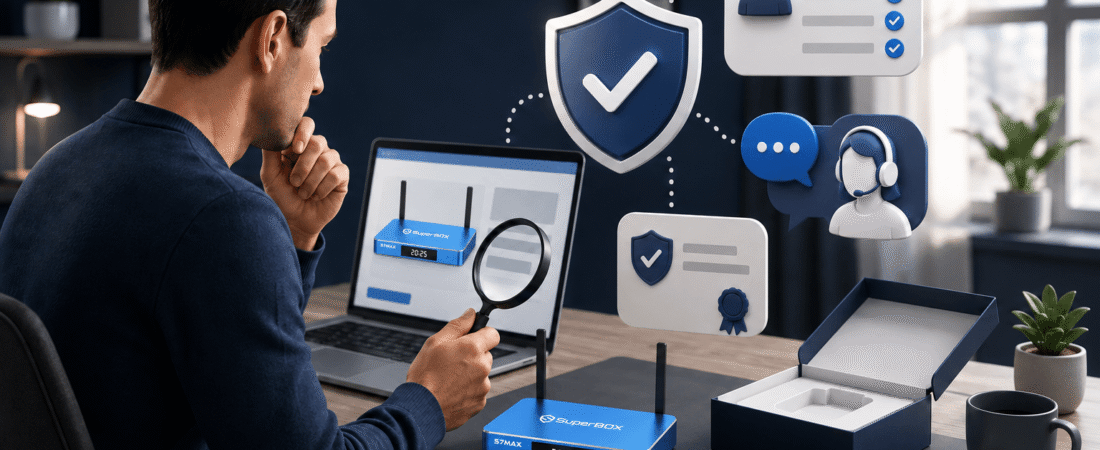
Quick Answer: How Do You Verify an Official Authorized SuperBox Seller?
- Look for clear authorization information instead of relying only on an “official” badge.
- Confirm that the seller publishes a real About page, Contact page, and business support details.
- Check that the exact SuperBox S7, S7 Ultra, or S7 Max product page includes complete specifications.
- Read the warranty, returns, shipping, and payment policies before checkout.
- Avoid sellers that pressure you to pay privately or refuse to provide written support information.
Check These 6 Details Before Buying a SuperBox TV Box
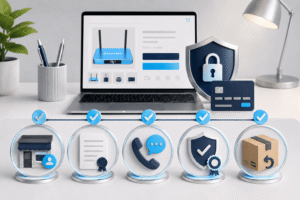
1. Look for verifiable authorization information
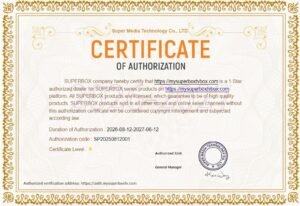
A genuine retailer should provide information explaining why it is authorized to sell SuperBox products. This may include an authorization letter, retailer statement, or other documentation that identifies the selling business.
Do not judge authorization only by a logo or badge. Check whether the information is connected to the same business name, website domain, and customer-service details shown during checkout.
2. Check the seller’s identity and contact details
A legitimate online retailer should provide more than a contact form. Look for a business email address, customer-service options, and clear instructions for order or product support.
The SuperBox Contact page should explain how to ask about product selection, setup, delivery, returns, and warranty issues. Never send passwords, complete payment details, or one-time verification codes to a seller or support agent.
3. Review the exact product page
Before ordering a SuperBox S7, confirm that the product page identifies the exact model and lists useful specifications. Important details may include storage capacity, memory, operating system, Wi-Fi support, Ethernet connection, remote control, and included accessories.
For example, the SuperBox S7 Ultra product page lists 4GB memory, 128GB storage, Wi-Fi 6, Gigabit Ethernet, and a backlit voice remote. The SuperBox S7 Max provides 4GB memory and 64GB storage as a more balanced configuration.
4. Read the warranty policy
A warranty should explain the coverage period, what types of defects are covered, what information the buyer must provide, and how to request service.
Be careful when a seller advertises a “lifetime warranty” but does not explain the actual process. A written SuperBox warranty policy should also clarify exclusions such as accidental damage, unauthorized modifications, incompatible firmware, internet problems, and third-party services.
5. Check returns and shipping before payment
Review the return window, return conditions, shipping destination, delivery estimate, and refund process. These details are especially important when buying a SuperBox TV box online.
Keep your order confirmation, packaging, and accessories until you are satisfied with the device. If a problem occurs, the retailer may request photos, video, or proof of purchase before approving a return or warranty review.
6. Confirm post-purchase support
A reliable seller should provide help after the sale. Support may include setup instructions, Wi-Fi troubleshooting, remote pairing, model selection, and warranty guidance.
Support quality can be more valuable than a small price difference. A seller that disappears after payment can leave you without help if the box does not connect, an app fails, or the device arrives damaged.

Use This Five-Minute Seller Verification Process
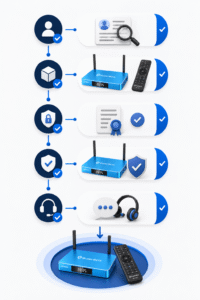
- Open the About page. Confirm whether the business is an independent authorized retailer.
- Find the authorization information. Look for an authorization letter or clear explanation connected to the same retailer name.
- Open the product page. Check the exact model, storage, remote, connectivity, accessories, and current price.
- Open the warranty and returns pages. Read the coverage period, exclusions, return window, and request process.
- Test the contact path. Make sure the seller provides a working email address, WhatsApp option, or support form.
- Review checkout carefully. Confirm the domain, payment method, shipping destination, and order information before submitting payment.
If a website makes it difficult to find these details, treat that as a warning sign. The best SuperBox seller is not always the one with the lowest advertised price; it is the one that gives you enough information to understand what you are buying.
Choose the Right SuperBox S7 Model After Verification
Once you have confirmed that the seller is trustworthy, compare the model that best fits your needs. The current SuperBox S7 Series includes several storage options, with the S7 Ultra and S7 Max being popular choices for buyers who want more than an entry-level configuration.
| Model | Storage | Remote | Best for |
|---|---|---|---|
| SuperBox S7 Ultra | 128GB | Backlit voice remote | Premium use and maximum storage |
| SuperBox S7 Max | 64GB | Full-size voice remote | Most households and everyday use |
| SuperBox S7 Pro | 32GB | Voice-command remote | Budget-focused buyers |
The SuperBox S7 Ultra is the better choice when you want more room for compatible apps, updates, and local files. Its backlit remote can also make nighttime navigation easier.
The SuperBox S7 Max is usually the better value for a typical family room. It provides 64GB storage, Wi-Fi 6, Gigabit Ethernet, and the core S7 experience without the highest price tier.
For a closer storage and feature comparison, read the existing SuperBox S7 Ultra vs S7 Max vs S7 Pro guide.
Why Warranty and Support Matter After You Buy
Even a well-built SuperBox TV box still depends on the television, HDMI cable, internet connection, router, software, and third-party services. When something does not work as expected, you need to know who is responsible for each part of the setup.
A clear support process should tell you what information to provide, such as the order number, exact model, description of the issue, photos, and troubleshooting steps already completed.
The seller’s FAQ page can answer common questions about models, setup, shipping, and compatibility. For a warranty issue, review the written policy before sending anything back.
For current SuperBox S7 availability, visit the SuperBox TV box collection and compare the individual product pages before checkout.
Product compatibility, app availability, playback quality, and third-party services can depend on your display, region, network, installed software and content provider. Do not accept claims that guarantee every channel or service permanently.
Final Checklist Before Ordering a SuperBox
- Is the seller’s business identity clearly explained?
- Can you view authorization or retailer information?
- Does the product page identify the exact SuperBox model?
- Are storage, remote, and connectivity specifications listed?
- Are warranty and return terms easy to find?
- Is there a real contact method for order and technical support?
- Does the checkout domain match the retailer you researched?
If the answer to these questions is yes, you have completed a more reliable buying check. Return to the SuperBox official store to review the store information, then compare the current S7 models before ordering.
For buyers who want maximum storage and a premium remote, the SuperBox S7 Ultra product page is the best place to check the current offer and retailer coverage.
FAQ
How can I tell if a SuperBox seller is legitimate?
Check whether the seller provides clear business information, authorization details, complete product pages, warranty terms, return policies, and working customer support.
Where can I verify a SuperBox authorization letter?
Look for authorization information on the seller’s About page and confirm that the retailer name, website domain, and contact details match the business taking your order.
What should a SuperBox warranty policy include?
It should explain the warranty period, covered defects, exclusions, proof-of-purchase requirements, troubleshooting steps, and how to request service.
Which SuperBox S7 model is best for most buyers?
The SuperBox S7 Max is generally the balanced option for most households. The S7 Ultra is better for buyers who want 128GB storage and a backlit voice remote.
What is the difference between SuperBox S7 Ultra and S7 Max?
The S7 Ultra has 128GB storage and a backlit voice remote. The S7 Max has 64GB storage and focuses on balanced everyday performance and value.
What information should I provide when contacting SuperBox support?
Provide your order number when applicable, exact model, checkout email, a clear description of the issue, relevant photos or video, and the troubleshooting steps already attempted. Never share passwords or verification codes.
Verify the Seller Before You Buy
Review the current SuperBox S7 models, retailer information, warranty coverage, and support options before placing your order.