

One of the most common questions before buying a streaming device is simple: does SuperBox need a subscription? In most cases, the SuperBox device is purchased as hardware rather than rented through a monthly cable contract. Buyers comparing current SuperBox TV boxes should still understand the difference between the device, internet service, and third-party apps before placing an order.
If you are considering the SuperBox S7 models, the short answer is that the box itself does not work like a traditional cable plan with a required monthly equipment fee. However, internet access is still necessary, and certain apps or content providers may have their own account or subscription requirements.
A SuperBox is a media device that connects to a television through HDMI and accesses online services through Wi-Fi or Ethernet. Our guide explains how a SuperBox TV box works and why the hardware purchase should be considered separately from the services you choose to use with it.

Contents
Key Takeaways
- The SuperBox device is generally a one-time hardware purchase.
- You still need an active internet connection for online streaming features.
- Third-party apps may require their own subscriptions or login credentials.
- Content availability can vary by region, app, network, software, and provider.
- Always review the product listing and current store policies before ordering.
The Short Answer: Does SuperBox Have a Monthly Fee?
The SuperBox TV box itself is not normally sold as a monthly rental service. You purchase the hardware, connect it to your television and internet, and use the compatible features and apps available on the device.
This is different from a traditional cable provider that may charge recurring fees for equipment, channel packages, and service access. It is also different from individual streaming platforms that bill customers every month for access to their own libraries.
The important distinction is that “no required SuperBox subscription” does not mean that every app or every online service is automatically free. The SuperBox hardware and each content provider should be evaluated separately.
What Do You Pay For When Buying a SuperBox TV Box?
When comparing the price of a SuperBox with cable or multiple streaming services, divide the potential expenses into three categories: the device, internet service, and optional third-party subscriptions.
| Cost Category | Is It Required? | What Buyers Should Know |
|---|---|---|
| SuperBox hardware | Yes | This is the one-time purchase of the TV box and included accessories. |
| Home internet | Yes for online features | Wi-Fi or Ethernet is needed for streaming, app access, and online content. |
| Third-party apps | Sometimes | Some apps are free, while others require an account or separate subscription. |
| Accessories | Optional | Extra remotes, Ethernet cables, or replacement accessories may be purchased separately. |
Your internet provider will continue to charge for the internet connection itself. That cost is not a SuperBox subscription; it is the same home internet service used by other connected devices in your household.
Does SuperBox S7 Need a Subscription?
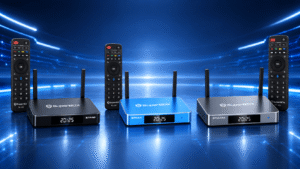
The SuperBox S7 series follows the same hardware-based buying model. The S7 Pro, S7 Max, and S7 Ultra are different models with different storage capacities and hardware features, not separate monthly service plans.
The current S7 lineup generally includes Android 12, 4GB of RAM, Wi-Fi 6, and Gigabit Ethernet. Storage is one of the most visible differences: the S7 Pro is the smaller-storage option, the S7 Max provides a middle-ground configuration, and the S7 Ultra offers higher storage and a more premium remote.
Our SuperBox S7 model comparison provides a closer look at storage, remotes, and everyday buying considerations.
| Model | Listed Storage | Best For |
|---|---|---|
| SuperBox S7 Pro | 32GB | Buyers who want the current S7 platform at the lowest entry point. |
| SuperBox S7 Max | 64GB | Households looking for a balanced combination of storage and value. |
| SuperBox S7 Ultra | 128GB | Users who prefer more storage and a premium remote experience. |
There is no need to select a higher model simply because you think it includes a different subscription. The main buying decision is about storage, remote features, performance needs, and budget.
What About SuperBox Channels and Apps?
Many users searching for “SuperBox subscription” are actually asking whether the box includes access to live TV, movies, sports, or other entertainment content. Channel availability is not determined only by the physical hardware. It can also depend on the installed application, source provider, region, network, and software version.
Before buying, review the current SuperBox channel guide to understand the types of programming and categories discussed for compatible models.
For apps such as Netflix, Prime Video, Disney+, Hulu, or other paid platforms, you should assume that the individual provider may require its own account and subscription. Those charges are billed by the app provider, not by the SuperBox hardware retailer.
Free apps may also be available, but “free” can mean different things. Some services are supported by advertising, some require registration, and some offer only part of their library without payment. Always check the terms shown inside the app before entering payment information.
What Should You Check Before Buying?
A clear purchase decision starts with the product listing and store policies. Before ordering, confirm the exact model, listed storage, included accessories, delivery terms, warranty coverage, and return conditions.
You can review the current purchase FAQ for answers about compatibility, shipping, returns, warranty support, and basic setup requirements.
- Confirm that your TV has a compatible HDMI input.
- Make sure your home internet connection is active and stable.
- Check whether the selected app requires a separate login or payment.
- Review the retailer’s warranty and return policy before checkout.
- Avoid sellers that promise unlimited access to every service without explaining the provider or terms.
A seller should be clear about what is included with the hardware and what is controlled by third-party applications. That distinction helps you compare the total cost more accurately and avoid unexpected charges.
Which SuperBox S7 Model Makes the Most Sense?
If you want a balanced option for normal household use, the 64GB SuperBox S7 Max is a practical choice for buyers who want more storage than the SuperBox S7 Pro without moving to the largest configuration.
The higher-storage SuperBox S7 Ultra may be more suitable if you plan to install more apps, keep more local media, or prefer the premium backlit remote. The SuperBox S7 Pro remains a sensible option for buyers who want the current S7 generation while keeping the initial hardware cost lower.
None of these models should be selected because of an assumed difference in monthly subscription fees. Choose based on how you plan to use the SuperBox, how much storage you need, and which remote or connectivity features matter most.
Is SuperBox Legal to Buy and Use?
The device itself is consumer electronics hardware. The legal question usually relates to how a user accesses content and whether the content provider has the appropriate rights or authorization.
For a more careful explanation of the difference between the hardware and the content accessed through applications, read our guide to Is SuperBox Legal.
Users should follow local laws and the terms of the services they access. A “no monthly fee” claim should never be interpreted as permission to access content that a provider has not authorized.
Frequently Asked Questions
Does SuperBox have a monthly fee?
The hardware itself is generally purchased as a one-time device. However, internet service and individual third-party apps may have separate recurring charges.
Can I use SuperBox without internet?
Most online features, live content, app access, and streaming functions require an internet connection. Some local media functions may work offline, but the main connected experience depends on Wi-Fi or Ethernet.
Does SuperBox include Netflix or other paid streaming services?
Do not assume that a SuperBox purchase includes paid accounts for Netflix, Prime Video, Disney+, or similar services. Those platforms normally manage their own subscriptions and login requirements.
Does the SuperBox S7 Ultra require a different subscription from the S7 Pro & S7 Max?
The S7 Ultra, S7 Max, and S7 Pro are different hardware configurations. The choice between them is mainly related to storage, features, and budget rather than separate monthly service plans.
Can channel availability change?
Yes. Apps, channels, and content sources can change over time. Availability may depend on software, region, network conditions, and the provider responsible for the content.
What is the safest way to compare the total cost?
Start with the device price, then add your existing internet cost and any paid apps you intend to use. Check the seller’s warranty, returns, and support terms before making a final decision.
Conclusion: Understand the Cost Before You Buy
So, does SuperBox need a subscription? The device itself is generally a one-time hardware purchase rather than a traditional monthly cable rental. You will still need internet access, and some third-party apps or content providers may charge separately.
Buyers comparing SuperBox options for U.S. buyers should focus on the model’s storage, remote, connectivity, and intended use instead of assuming that a more expensive model includes a different service plan.