

Short answer: A SuperBox S8 Max soundbar setup starts with the TV: the box sends video and audio to the television through HDMI. If your television already sends its audio to a soundbar, that existing TV-to-soundbar route is usually the first one to check. Before ordering, look at the labels on your TV and soundbar: an ordinary HDMI input for the box, and either matching HDMI ARC/eARC ports or an optical audio output and input for the soundbar.
That simple port check can save a surprising amount of guesswork. Buyers exploring a SuperBox TV setup often focus on the streaming box and forget that sound has to travel through the rest of the room.
If you are comparing devices, the current SuperBox S8 selection gives you the model choices. This guide helps you check whether the audio equipment you already own fits the plan.
Start with the connection you already use
Is your soundbar already playing audio from the TV’s built-in apps or another HDMI device? If so, you may need only an available HDMI input on the TV for the SuperBox S8 Max. The TV receives the box’s signal and sends audio along its existing soundbar connection. Whether it does so for every input depends on the TV’s audio settings and the soundbar connection, so test another HDMI source if you can.
If the television is older, check the back or side panel rather than relying on the model year. The important question is whether it has a free HDMI input. Our older-TV HDMI checklist covers that display-side decision in more detail.

SuperBox S8 Max soundbar setup: three audio paths
The easiest path depends on the ports you already have. Read the labels on the actual TV and soundbar; identical-looking HDMI sockets can have different jobs. The SuperBox S8 Max product listing names HDMI and SPDIF among its connections, but it does not specify every possible direct-audio cable or sound format. Avoid buying an adapter based on a port name alone.
1. TV HDMI input, then TV HDMI ARC/eARC to soundbar
Connect the box to a normal HDMI input on the TV. If both the TV and soundbar have ports specifically marked HDMI ARC or eARC, their existing ARC/eARC connection may carry the TV’s sound to the bar. Check that the TV is set to the SuperBox input and that the TV’s sound output is set to the connected sound system. Names for these controls vary by TV brand.
Do not assume that the SuperBox S8 Max itself needs an ARC port. In this arrangement, ARC/eARC describes the link between the TV and soundbar. The streaming box occupies another TV HDMI input. That distinction matters when counting free ports before buying.
2. TV HDMI input, then TV optical output to soundbar
If your TV and soundbar lack matching ARC/eARC ports but have optical audio connections, the box can still connect to the TV by HDMI while a separate optical cable runs from the TV’s optical output to the soundbar’s optical input. Confirm that the TV actually passes audio from external HDMI sources through its optical output; the TV manual or an existing device can help you test this.
The soundbar’s input selection and the TV’s digital-audio setting may need adjustment. If you have a picture but silence after installation, the SuperBox S8 picture-without-sound checks offer a separate troubleshooting path. The goal here is to choose a workable connection before you order.
3. Box to soundbar, then soundbar to TV
Some soundbars have both an HDMI input for a source device and an HDMI output for the TV. That can create a direct path through the soundbar. It is only a sensible plan if the specific soundbar supports video pass-through at the resolution and features you want, and the TV connection matches its manual. Do not mistake a single HDMI ARC/eARC socket on a soundbar for a general-purpose HDMI input.
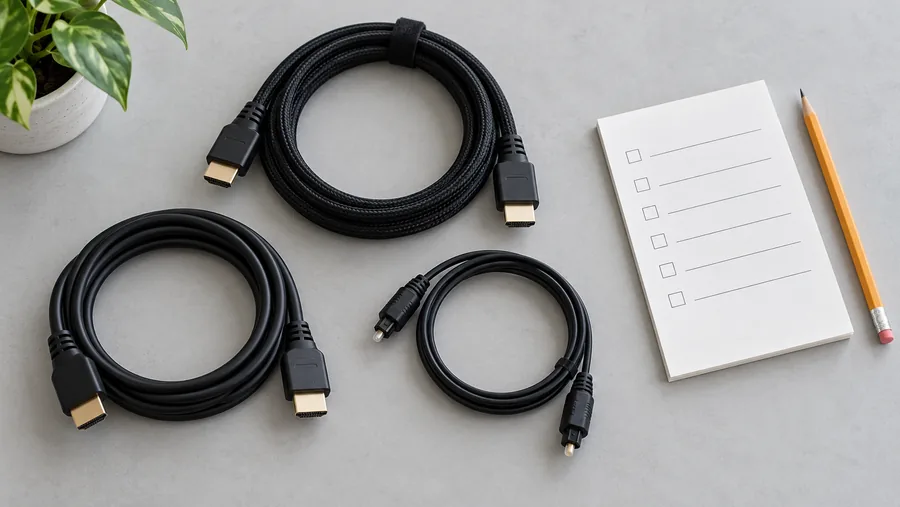
A five-minute checklist before checkout
- Count free TV HDMI inputs. The SuperBox S8 Max needs an HDMI path to the display for the straightforward setup described here.
- Read the soundbar ports. Note whether it has HDMI ARC/eARC, HDMI IN, optical input, or only another connection.
- Read the TV audio outputs. Look for HDMI ARC/eARC or optical output, and check the TV manual for audio from external HDMI sources.
- Check where each device will sit. Allow a stable surface for the box, a clear view of the TV, room for the soundbar, and enough cable length without strain.
- Check the TV’s audio menu. Locate its external-speaker setting before the box arrives. You can verify the exact steps using your TV’s manual.
The SuperBox S8 Max unboxing and first setup guide is useful once the hardware arrives. It covers the box’s initial connection and first-run checks; this article is the buying-stage companion for the existing TV and soundbar.
What if you use two televisions or move the box?
A second room can have a completely different audio path. One TV may already use an ARC soundbar, while a bedroom TV has only built-in speakers. If you plan to move a single box between rooms, count the available HDMI inputs and power outlets in each room, and remember that audio settings may differ. Our two-TV reality check explores the practical trade-offs of that plan.

Is SuperBox S8 Max the right box for this room?
The current SuperBox S8 Max listing includes HDMI, SPDIF, AV, Ethernet and wireless connectivity. For the ordinary TV-first soundbar routes above, HDMI is the relevant display connection. The listing does not, by itself, tell you whether a particular TV and soundbar will pass every audio format or support every third-party app. Those outcomes depend on the complete system.
If you are still comparing models, the SuperBox S8 Max first-time buyer guide covers broader purchasing questions such as the model’s everyday features. Do not pay for a different model simply to solve a TV-to-soundbar port mismatch; confirm the actual wiring first.
Quick questions buyers ask
Does the soundbar connect directly to the SuperBox S8 Max?
It can be possible with equipment that has the right source input and supports the needed audio and video path. For many households, the simpler plan is to send the box’s HDMI signal to the TV and use the TV’s existing ARC/eARC or optical connection to the soundbar. Check the labels and manuals for the exact devices you own.
Will any HDMI cable or adapter solve a missing port?
No. A cable cannot create ARC/eARC support or a soundbar HDMI input that the hardware does not have. If a required port is missing, ask the TV or soundbar manufacturer which connection is supported before buying a converter.
What if I need help after buying?
Keep your TV and soundbar model numbers, a photo of their labeled ports, and your order details. The SuperBox S8 warranty and support guide explains how to distinguish retailer support from a TV, cable or third-party service issue.
The buying decision
A SuperBox S8 Max soundbar setup works best when you choose the wiring path first: one free TV HDMI input for the box, then a confirmed route from the TV to your soundbar. If the TV and soundbar already work together, test them with another HDMI source before changing anything. Once that checks out, you can compare the SuperBox S8 options for your living room with more confidence.
Ready to order? Enter code SP10 at checkout for a 10% discount on eligible orders; confirm that it applies to your cart before paying. The button below takes you to the current SuperBox S8 Max listing and its complete product details.
Related guide: See the SuperBox S8 model overview