

Buying your first SuperBox S8 Max is a little different from replacing one SuperBox TV Box with another. If you have never owned a SuperBox TV Box before, the important questions are not limited to processor specifications or storage numbers. You also need to know what comes in the box, what your TV and home network need, how much storage is actually useful, where apps come from, what to check before paying, and what your first setup should look like.
The SuperBox S8 Max currently sits near the center of the SuperBox S8 lineup, combining 4GB DDR memory, 64GB eMMC storage, WiFi 6, Gigabit Ethernet, Multi-View, Picture-in-Picture, built-in recording, and 7-Day Time Shift at a current price of $399.
If this is your first time researching the brand, you can also browse the wider SuperBox S8 collection before deciding whether the SuperBox S8 Max is the right configuration for you.
Instead of repeating another specification-heavy review, this guide focuses on the things a first-time buyer is most likely to discover only after ordering — and helps you check them before checkout.
What Kind of Buyer Is the SuperBox S8 Max Designed For?
The SuperBox S8 Max makes the most sense for someone who wants more than an entry-level streaming device but does not necessarily need the 128GB storage of the SuperBox S8 Ultra.
Think of the Max as the best-value model in the SuperBox S8 family. It provides 64GB of storage, the broader SuperBox S8 viewing features, full-size voice remote control, WiFi 6, wired Gigabit Ethernet, and recording functionality without moving all the way to the top-priced model.
For first-time buyers, that middle position is important. You are less likely to feel limited by 32GB storage later, while avoiding paying extra for capacity you may never use.
1. Understand What You Are Actually Buying
The first mistake new buyers make is thinking only in terms of “a box that connects to the TV.”
The SuperBox S8 Max is an Android-based home entertainment device. It connects to your television through HDMI and uses your home internet connection through WiFi or Ethernet. Its role is to bring together applications, entertainment interfaces, live viewing tools, recording, playback, and smart-TV functions in one system.
If the SuperBox platform is completely new to you, read our explanation of what SuperBox is and how it works before ordering. That article covers the basic concept, while this guide focuses specifically on what a first-time SuperBox S8 Max buyer should prepare for.
2. Check Your TV Before You Place the Order
You do not need the newest television on the market to use a SuperBox S8 Max, but there are a few basic requirements worth checking before checkout.
Your TV or display should have an available HDMI input. You also need access to a power outlet near the television and a home internet connection.
The package currently includes the SuperBox S8 Max itself, a voice remote, user guide, power cable, and HDMI cable, so most first-time buyers should have the basic hardware needed to connect the box right away.
If your television already has several devices connected — such as a game console, sound system or Blu-ray player — check whether you still have an open HDMI port. This simple detail can save a surprising amount of frustration on setup day.
3. Decide Whether You Will Use WiFi or Ethernet
The SuperBox S8 Max supports both dual-band WiFi 6 and 1000Mbps Gigabit Ethernet. First-time buyers often focus on the WiFi specification and overlook the wired option.
If your router is located close to the television, Ethernet can be an excellent choice because it removes many of the variables associated with wireless signal strength. If the router is across the house, WiFi is usually much more convenient.
First-time buyer tip: Do not assume that buying a WiFi 6 device automatically fixes weak home WiFi. Router location, internet service, walls, interference, and the number of connected devices still matter.
4. Know What 64GB Storage Means in Real Use
The SuperBox S8 Max includes 4GB DDR RAM and 64GB eMMC storage.
For a first-time buyer, the easiest way to understand this is to separate RAM from storage. The 4GB RAM supports active system operation and multitasking, while the 64GB storage is where installed applications, recordings, and other compatible local data are kept.
The SuperBox S8 Max provides twice the storage of the 32GB SuperBox S8 Pro. That extra headroom can become useful once you start installing apps or using the built-in recording feature.
However, buying the SuperBox S8 Max does not mean everyone needs to fill 64GB. If your usage is light, much of that capacity may remain available. The value is having extra room before storage becomes something you have to actively manage.
If you already know you plan to save significantly more content or want maximum storage from the beginning, see our SuperBox S8 Ultra vs SuperBox S8 Max comparison before deciding.
5. The SuperBox S8 Max Is More Than Its Storage Capacity
One reason first-time buyers often land on the Max is that its differences are not limited to having more storage than the entry model.
The SuperBox S8 Max includes several features designed around how people actually use a living-room television:
- Multi-View for supported simultaneous viewing layouts
- Picture-in-Picture for keeping one program visible while viewing another area
- Built-in recording for saving supported on-screen content
- 7-Day Time Shift for greater flexibility with recently available live programming
- Voice control for faster searching and navigation
- Parental Control for managing content access
- 4K playback and H.265 decoding
- WiFi 6, Gigabit Ethernet and Bluetooth 5.2
These are the features that separate the purchase from simply buying another basic HDMI streaming stick.
6. Do Not Judge the Box Only by the “6K” Specification
The technical specification lists H.265 6K@60fps decoding, while the product also supports 4K playback.
For a first-time buyer, the important point is that the actual resolution you see depends on more than the box. Your television, source material, application, network conditions, and the original video resolution all matter.
In other words, buying a device capable of higher-resolution decoding does not turn every piece of content into 6K. A good buying decision should be based on the whole feature package rather than one headline resolution number.
7. Be Selective About the Apps You Install
Because the SuperBox S8 Max runs Android, apps become an important part of the ownership experience. But first-time users should avoid the temptation to install everything they find online.
Use supported and trusted sources whenever possible and pay attention to the permissions requested by unfamiliar applications.
Good first-day rule: Set up the device first, confirm the system and network are working correctly, and then add the apps you actually intend to use. Avoid filling a new box with unknown applications before you know the base system is stable.
8. Know the Difference Between Built-in Features and Third-Party Services
Another useful distinction for a new owner is the difference between the hardware and software features included with the device and services operated by third parties.
The SuperBox S8 Max hardware provides the platform, storage, network connectivity, interface, and supported viewing tools. Third-party apps and services can have their own accounts, subscriptions, availability rules, and regional restrictions.
That distinction matters because a first-time buyer should never assume that purchasing the hardware automatically includes every unrelated paid streaming service.
If the content side of SuperBox is one of your main questions before buying, our SuperBox channels guide provides a separate overview.
9. Check the Exact Seller Before You Pay
When searching Google for SuperBox S8 Max for Sale or where to buy official SuperBox S8, you may find multiple stores, marketplaces, and product listings.
Do not evaluate them only by whichever page shows the lowest number.
A first-time buyer should check:
- Who is actually selling the product
- Whether the exact SuperBox S8 Max configuration is clearly stated
- Whether the seller provides reachable customer support
- Shipping and delivery terms
- Return conditions
- Warranty coverage
- What accessories are included
If seller authenticity is one of your concerns, use our guide on how to verify an authorized SuperBox seller before checkout.
10. Read the Warranty Before You Need the Warranty
Warranty information is easy to ignore when everything is working correctly, but this is exactly when a buyer should read it.
The SuperBox S8 Max listing includes a one-year retailer warranty and a 30-day return request window, subject to the published store policies.
You can also read our own SuperBox S8 warranty and support guide before ordering.
11. What Exactly Comes in the SuperBox S8 Max Box?
For a first-time purchase, knowing what you should receive makes setup easier and helps you confirm the package immediately after delivery.
The current SuperBox S8 Max package lists:
- SuperBox S8 Max
- Voice remote
- User guide
- Power cable
- HDMI cable
When your order arrives, it is a good idea to check the package contents before moving on to installation.
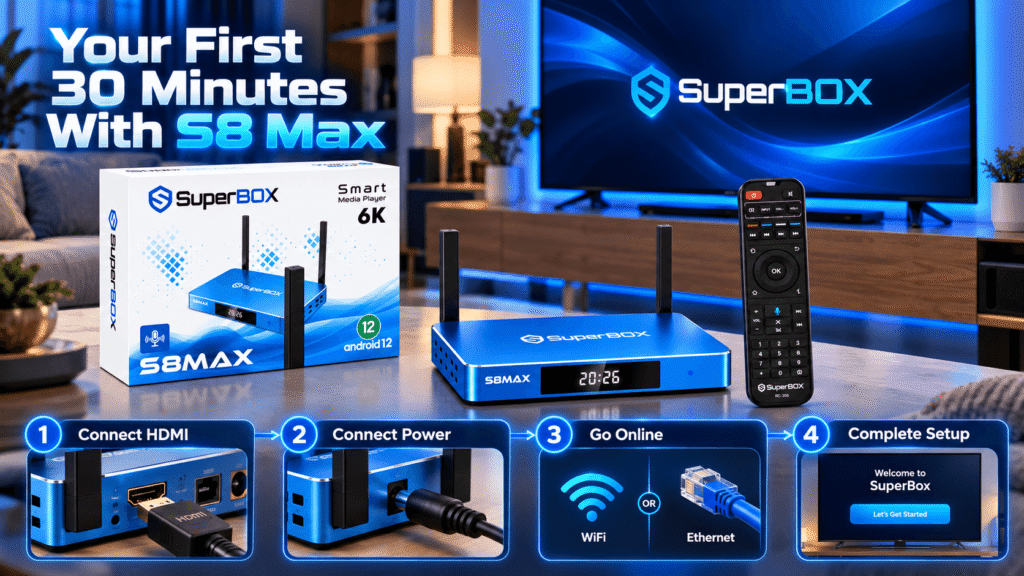
12. Your First 30 Minutes With the SuperBox S8 Max
A first-time setup does not need to be complicated. A sensible order is:
- Unpack and verify the accessories.
- Connect the SuperBox S8 Max to your TV using HDMI.
- Connect the supplied power cable.
- Select the correct HDMI input on the TV.
- Connect to WiFi or Ethernet.
- Complete the on-screen settings.
- Test the remote and voice functions.
- Check playback before installing additional apps.
- Add only the applications you plan to use.
Doing the setup in this order makes troubleshooting easier because you know the basic device and connection are working before adding extra software.
13. The Ports Are Worth Checking Before You Buy Accessories
The SuperBox S8 Max offers USB 3.0, USB 2.0, TF card, HDMI, AV, LAN, SPDIF, IR and power connections.
That flexibility is useful if you plan to connect wired internet, external storage, audio hardware, or other compatible accessories.
Before buying extra adapters or hubs, however, decide what you actually intend to connect. New owners often purchase accessories before discovering that the device already provides the port they need.
14. SuperBox S8 Max Price: What Are You Paying For?
The current SuperBox S8 Max Price is $399.
The more useful question for a first-time buyer is not whether $399 is objectively cheap or expensive. It is what the extra cost buys compared with a simpler device.
With the SuperBox S8 Max, the purchase price covers the 64GB storage configuration, Android 12 hardware platform, WiFi 6, Gigabit Ethernet, Bluetooth 5.2, voice remote, expanded ports, Multi-View, Picture-in-Picture, recording, Time Shift, and the broader SuperBox S8 entertainment environment.
If those are features you expect to use, the SuperBox S8 Max has a clearer value proposition. If you only need a device for one or two apps and never expect to record, use multi-view, or connect additional hardware, a simpler device may meet your needs.
15. Three Questions to Ask Yourself Before Clicking “Order”
1. Will I actually use the SuperBox S8 Max features?
If recording, Time Shift, Multi-View, voice navigation, and 64GB storage sound useful, the SuperBox S8 Max is easier to justify.
2. Is my home setup ready?
Confirm your TV has HDMI, your network is stable, and you have space near the television for the box.
3. Have I checked the seller and policies?
Know who is taking your payment, how delivery works, how returns are handled, and who provides warranty support.
Final Checklist Before Ordering the SuperBox S8 Max
Before completing your order, make sure the following statements are true:
- I know I am ordering the SuperBox S8 Max and not another SuperBox S8 model.
- I understand that the SuperBox S8 Max has 4GB DDR RAM and 64GB eMMC storage.
- My TV has an available HDMI input.
- I have suitable WiFi or Ethernet access near the TV.
- I understand what is included in the package.
- I have checked the current price, shipping, return, and warranty terms.
- I know which apps and features I actually intend to use.
- I am buying from a clearly identified seller with accessible support.

Ready to Order Your First SuperBox S8 Max?
For a new SuperBox TV box owner, the SuperBox S8 Max is appealing because it does not force you immediately into either extreme of the SuperBox S8 lineup. It provides significantly more flexibility than an entry configuration while keeping the price below the 128GB SuperBox S8 Ultra.
If your priorities include 64GB storage, recording, Multi-View, Time Shift, WiFi 6, Gigabit Ethernet, and a full-size voice remote, the SuperBox S8 Max gives you a well-rounded starting point into the SuperBox S8 generation.
You can browse the latest SuperBox models through our SuperBox official store or check the current configuration and availability directly on the SuperBox S8 Max product page.
FIRST-TIME BUYER OFFER: Enter SP8 during checkout to receive 8% OFF your SuperBox order.

Related guide: See the SuperBox S8 model overview