

The best VOD apps for SuperBox S7 users depend on the type of content you watch, whether you prefer free or paid services, and which apps are supported on your device. A SuperBox S7 can be used with a range of on-demand video platforms, but app availability may vary by region, software version, network, and provider.
For buyers comparing the current SuperBox S7 collection, the S7 Pro, S7 Max, and S7 Ultra provide different storage options for apps, local media, and everyday entertainment. This guide covers built-in options, subscription services, free ad-supported platforms, and safe app installation practices.
If you plan to install several streaming apps, the SuperBox S7 Max offers a useful balance of storage, performance, and price. However, choosing an app should come before choosing a model, because not every service is available on every Android-based TV box.

Contents
Key Takeaways
- VOD means video on demand, so you choose a movie or show instead of following a live schedule.
- Netflix, Prime Video, Disney+, Hulu, and Max normally require their own subscriptions.
- YouTube, Tubi, Pluto TV, and Plex may provide free or ad-supported viewing options.
- Device-specific apps such as Blue VOD may depend on your SuperBox model and software version.
- Always install apps through official or supported sources and use valid accounts when required.
What Does VOD Mean on a SuperBox?
VOD stands for video on demand. Unlike live TV, VOD lets you select a movie, series, documentary, or other program when you want to watch it.
A SuperBox TV box can provide access to different types of entertainment apps, including subscription platforms, free ad-supported services, personal media tools, and device-specific applications.
If you are new to the category, our guide explains how the SuperBox works before you start installing individual services.
VOD apps do not all work in the same way. Some require a monthly plan, some show advertising, some offer optional rentals, and some may be available only in selected regions.
Free, Paid, and Built-In App Types
| App Type | Typical Cost | Best For | What to Check |
|---|---|---|---|
| Subscription VOD | Monthly or annual plan | Premium movies, series, and originals | Account, region, and current pricing |
| Free ad-supported VOD | Free with advertising | Casual viewing without another subscription | Library availability and advertising limits |
| Built-in or device-specific apps | Depends on the device and service | Integrated SuperBox viewing experience | Model, firmware, and provider availability |
| Personal media apps | Free or optional premium plan | Private media libraries and local playback | Storage, network access, and file compatibility |
The SuperBox channels guide is useful when you want scheduled programming, while VOD apps are better when you want to search for a specific movie or series.
12 Best VOD Apps for SuperBox S7 Users
1. Blue VOD
Blue VOD is a device-specific option that may appear on compatible SuperBox models and software versions. It is designed around movie and television browsing within the SuperBox ecosystem.
Because built-in apps can change after updates or vary between models, check the current app list on your SuperBox S7 before treating Blue VOD as a guaranteed feature. Availability, content, and playback can also depend on the provider and region.
2. Netflix
Netflix remains one of the most recognizable subscription VOD services, with movies, series, documentaries, and original productions.
Netflix requires its own account and subscription. If the app is available as a compatible option on your SuperBox, sign in with your existing Netflix credentials rather than assuming access is included with the hardware purchase.
3. Amazon Prime Video
Prime Video combines movies, television series, original programs, and selected rental or purchase titles. It can be useful for households that already use Amazon services.
Some titles may require a Prime membership, while others may involve separate rental or purchase charges. Always check the title information inside the official app before starting playback.
4. YouTube
YouTube is one of the most flexible VOD options because it includes free videos, music, educational content, documentaries, trailers and selected movies.
YouTube Premium is optional and can remove advertising on eligible content. Some movies and programs may also be rented or purchased separately.
5. Disney+
Disney+ is a strong choice for households interested in Disney, Pixar, Marvel, Star Wars and National Geographic content.
The service requires its own subscription, and the available library may vary by country. Check whether the current Disney+ app is supported on your SuperBox software before subscribing specifically for that device.
6. Hulu
Hulu focuses on television series, current programming, movies, and Hulu Originals. It may appeal to users who want a mixture of on-demand TV and film content.
Hulu plans and availability can differ by market. Some packages also include live television, but the exact features depend on the plan selected through Hulu.
7. Max
Max brings together premium series, movies, documentaries, and content from brands such as HBO, Warner Bros., and DC.
Max requires a separate subscription and may offer different plans or video quality options. Confirm that the current app version supports your SuperBox television before relying on it as your primary service.
8. Paramount+
Paramount+ offers movies, television series, original programs, and selected franchise content. It can be a useful addition for viewers who want a different catalog from Netflix, Prime Video or Disney+.
Content, plans, and availability may change by region. Use the official app and review the current subscription terms before signing up.
9. Peacock
Peacock provides a combination of movies, television series, original content, and selected free viewing options. The service can be useful for users who want both free and premium tiers in one platform.
Free content and paid content may be separated by plan. Check the account requirements and regional availability before installation.
10. Tubi
Tubi is a free, advertising-supported streaming service with movies and television programs available without a traditional monthly subscription.
The catalog is supported by advertising and may vary by location. Tubi is a good option for casual viewing when you want to reduce the number of paid services in your household.
11. Pluto TV
Pluto TV combines free on-demand movies and television shows with live-style channels. It is useful for viewers who want a simple service without adding another paid subscription.
Pluto TV is advertising-supported, and its content lineup can change. It is different from a paid VOD platform because the viewing experience includes both scheduled channels and on-demand content.
12. Plex
Plex can provide free ad-supported content and can also help organize personal media stored on compatible devices or a home server.
Plex is especially useful for users who want one interface for online content and their own media collection. Some advanced features may require a Plex account or an optional premium plan.
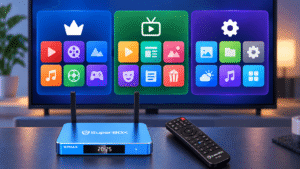
How to Install VOD Apps Safely on SuperBox S7
Start by checking the app store or supported app source available on your SuperBox. If an app is not listed, do not assume that installing an unknown APK is safe or that it will work correctly.
- Connect the SuperBox to your television and internet.
- Open the available app store or supported application source.
- Search for the official app name carefully.
- Review the developer name and app permissions.
- Install the app and sign in only through the official service.
- Test playback before adding more apps.
For HDMI, internet, and first-time device setup, follow the SuperBox app installation guide before troubleshooting individual applications.
Do not enter payment information into an unofficial app that promises access to every premium service for one low fee. Unverified applications can disappear, stop working, or create security and privacy risks.

What If a VOD App Does Not Work?
If one app does not open or playback stops, first check whether other apps work normally. If every app has a problem, the issue may involve the internet connection, router, or device settings. If only one app fails, the problem may be related to that provider or app version.
- Restart the SuperBox and home router.
- Check that the device has a stable WiFi or Ethernet connection.
- Update the app if an update is available through a supported source.
- Close unused apps running in the background.
- Clear temporary app data only when you understand the effect.
- Test another legal VOD service to compare playback.
For buffering, failed app launches, missing signal, or other common problems, use the SuperBox app troubleshooting guide before performing a factory reset.
Security reminder: Avoid unknown APK websites, modified applications, and services that promise unauthorized access to paid content. Use official apps, valid subscriptions, and content sources that you are permitted to access.
If the issue continues after basic checks, SuperBox app support can help you prepare the model, order, and troubleshooting details needed for assistance.
Which SuperBox S7 Model Is Best for Multiple Apps?
The SuperBox S7 Pro, S7 Max, and S7 Ultra use the same general S7 platform, but storage differs between the models. More storage can be useful if you plan to install several streaming apps, keep local media or use additional utility tools.
SuperBox S7 Pro
Best for buyers who want the S7 platform and a smaller app collection while keeping the starting cost lower.
SuperBox S7 Max
Best overall balance for households that want 64GB storage and several VOD apps for daily use.
SuperBox S7 Ultra
Best for users who prefer 128GB storage, a premium remote, and more room for apps and local files.
For most users installing a practical mix of free and paid services, the 64GB S7 Max offers a balanced starting point. The Ultra may make more sense if you want additional storage, while the Pro is suitable for a simpler setup.
Before ordering, review the app compatibility FAQ because software, region, network, and content providers can affect which services are available.

Final Recommendation
The best VOD app for your SuperBox S7 depends on what you watch and how you want to pay for content. Netflix, Prime Video, Disney+, Hulu, Max, and Paramount+ are useful for users with paid subscriptions, while YouTube, Tubi, Pluto TV, and Plex offer more flexible free or ad-supported options.
Device-specific apps such as Blue VOD may provide an integrated experience, but availability should always be checked on the actual SuperBox model and software version. Do not treat a third-party app promise as a guarantee of permanent access or legal authorization.
When you are ready to compare storage and app capacity, review the SuperBox TV box options available for your setup.
FAQ
What is the best VOD app for SuperBox S7?
There is no single best app for every user. Netflix, Prime Video, Disney+, Hulu, and Max are strong paid options, while YouTube, Tubi, Pluto TV, and Plex provide more flexible free or ad-supported choices.
Does SuperBox S7 include free VOD apps?
Some free or device-specific apps may be available, depending on the model, software version, and region. Always check the current app list on your device.
Do Netflix and Disney+ require subscriptions on SuperBox?
Yes. These services normally require their own accounts and subscriptions. Purchasing a SuperBox does not automatically include paid accounts for third-party streaming platforms.
Can I install apps that are not shown in the app store?
App availability depends on the device and supported software sources. Avoid unknown APK files and verify the developer and source before installing any application.
Which SuperBox model is best for many VOD apps?
The S7 Max is a balanced choice for many households because it offers 64GB storage. The S7 Ultra provides more storage, while the S7 Pro is better for a smaller app collection.
Why does a VOD app buffer on SuperBox?
Buffering may be caused by WiFi strength, internet congestion, app issues, source availability, or device software. Test another app and try restarting the router and SuperBox before changing advanced settings.