

SuperBox S8 Ultra Review, in brief: The SuperBox S8 Ultra is the $449 flagship in the store’s current S8 lineup, with 4GB DDR RAM, 128GB eMMC storage, a backlit voice remote, WiFi 6, Gigabit Ethernet, and supported Multi-View and recording features. It can be worth the premium for a household that needs more local space and regularly uses its viewing controls. If you use only a few apps and rarely save files, the 64GB SuperBox S8 Max may cover much of the same ground for less.
This review looks beyond the largest number on the spec sheet. It checks the published hardware, what 128GB can and cannot change, 4K playback, the remote, apps and channels, setup, and the trade-offs behind the price. The analysis draws on the current SuperBox S8 Ultra product listing and practical buying scenarios. It does not claim hands-on benchmarks, measured app-loading times, or long-term reliability testing. Start with the SuperBox S8 lineup if you are comparing the entire range.
SuperBox S8 Ultra Specifications: Complete Hardware Overview
The following SuperBox S8 Ultra specifications are taken from the current product page. A decoder specification describes what compatible video the hardware can process; it is separate from the picture a particular app and TV will display.
| Specification | SuperBox S8 Ultra |
|---|---|
| Operating system | Android 12.0 |
| Processor / GPU | Quad-core ARM Cortex-A53 / Mali-G31 MP2 |
| RAM / internal storage | 4GB DDR / 128GB eMMC |
| Wireless / wired networking | Dual-band WiFi 6 / 1000Mbps Gigabit Ethernet |
| Bluetooth | Bluetooth 5.2 |
| Video playback | Up to 4K on compatible content and displays |
| Video decoding | H.265 hardware decoding rated up to 6K@60fps |
| Included remote | Backlit voice command remote |
| USB / TV connection | USB 3.0, USB-C, and HDMI |
| Other listed connections | LAN, TF, SPDIF, AV, IR, restore, and DC 5V/2A power input |
| Viewing tools | Full-channel Multi-View, picture-in-picture, supported recording, and up to seven-day time shift |
On a phone, swipe within the table to see both columns. The choices most likely to affect a buying decision are the 128GB capacity, backlit remote, and connection options. The processor and 4GB RAM matter too, but they are not evidence that the Ultra is faster than every other S8 model. The SuperBox S8 lineup review provides wider context.
SuperBox S8 Ultra Design and Build Quality
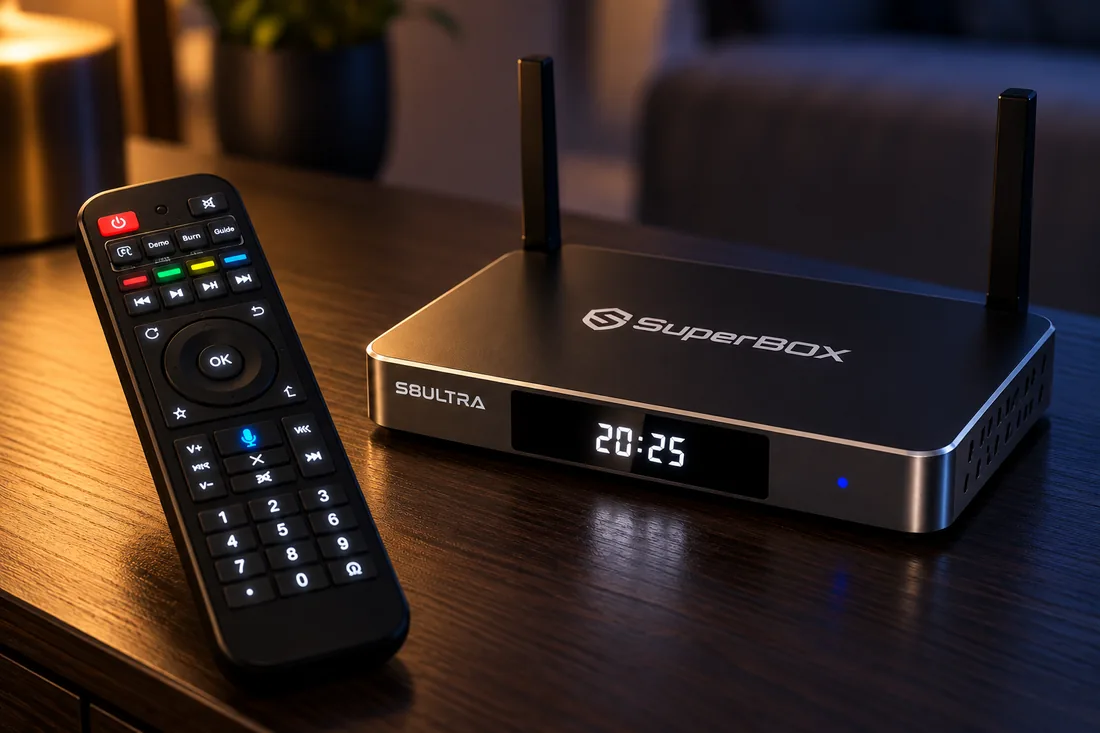
The current imagery shows a compact dark TV box with two upright antennas, a front display, side ventilation, and a full-size remote. That shape should fit a typical TV console more easily than a large home-theater component, provided there is room for the antennas, HDMI and power cables, and airflow. The published port list gives options for compatible displays and accessories, but the exact placement of every rear connector is best checked against the product gallery before ordering.
We can describe the visible layout without claiming a measured weight, casing temperature, noise level, or durability result. If the device is a gift, the SuperBox S8 Ultra unboxing and setup guide shows what to check when it arrives. The backlit remote deserves its own assessment below because it affects daily navigation more directly than the exterior finish.
SuperBox S8 Ultra 128GB Storage: Is It Really Worth It?
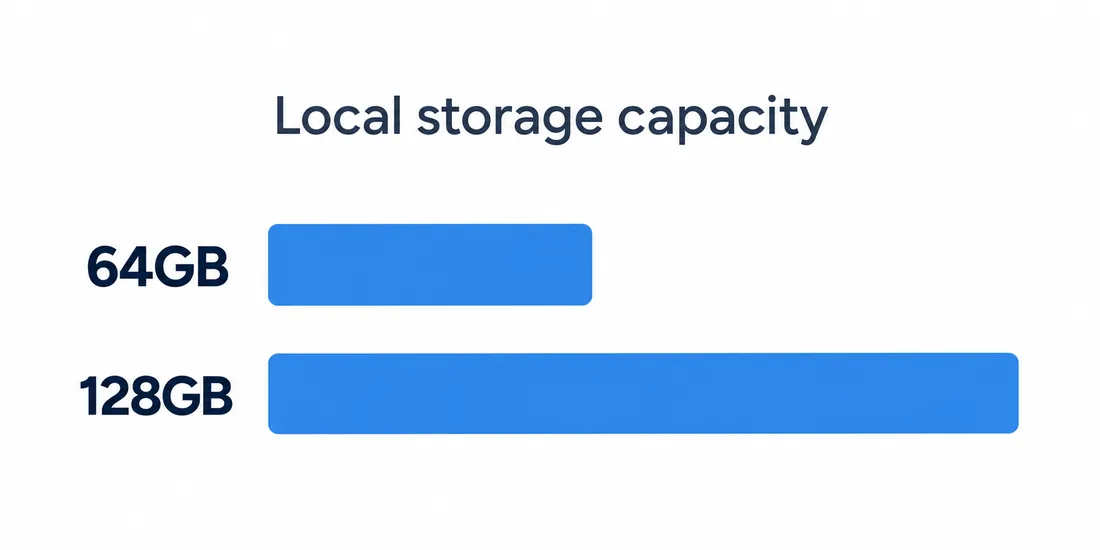
The 128GB eMMC figure is the Ultra’s most obvious distinction from the 64GB S8 Max and S8 Plus. It is total listed internal capacity, so Android, preinstalled software, app data, and updates occupy part of it. The seller does not publish a reliable fixed usable-space number; check the storage meter on your device after setup rather than assuming all 128GB is free.
Extra room is useful when several people keep a broad mix of compatible apps, when permitted apps store local media, or when supported recordings accumulate. It also reduces how often a household has to delete files just to install an update. The original buying question still applies: are you regularly clearing storage on your current device, or do you mainly stream through two or three apps? If the latter describes you, the extra capacity may sit unused.
More storage is a capacity benefit, not a CPU upgrade. The SuperBox S8 Ultra and SuperBox S8 Max both list 4GB RAM and the same published Cortex-A53 and Mali-G31 MP2 core hardware. Neither a weak internet connection nor a slow content source becomes faster because the local drive is larger. Our SuperBox S8 storage guide helps estimate the space you actually need, and the SuperBox S8 Ultra versus SuperBox S8 Max comparison explores the 128GB-to-64GB trade-off.
SuperBox S8 Ultra Performance and Everyday Experience
Android 12.0, a quad-core ARM Cortex-A53 processor, Mali-G31 MP2 graphics, and 4GB DDR RAM define the published SuperBox S8 Ultra hardware. The product page describes a redesigned interface and an updated streaming system. Those descriptions tell us what the box offers, but they do not establish benchmark scores, app launch times, measured multitasking performance, or long-term stability.
For ordinary use, consider the actions you repeat: moving through the home interface, opening a supported live-TV or VOD app, searching with the remote, and returning to a previous program. The backlit keys can make those actions easier in a dim room. A household with several users may also appreciate capacity for more compatible apps and local files. Actual response times can vary by app version, available storage, network quality, background activity, and updates.
The honest performance question is whether this combination fits your routine. If your existing box already handles a small app set, extra storage alone is a weak reason to replace it. If buffering is the main complaint, test the connection and content source first; our SuperBox S8 fit and limitations guide covers those trade-offs without assuming a hardware fault.
SuperBox S8 Ultra 4K Playback and H.265 Video Decoding
The product listing supports up to 4K playback with compatible content and displays. It separately rates the H.265 hardware decoder up to 6K at 60 frames per second. H.265, also called HEVC, is a compression format. The 6K decoder rating does not promise 6K output from every app, nor does it make a lower-resolution stream look like true 4K.
Your TV’s resolution, HDMI connection, source bitrate, app rights, and home network all influence picture quality. The published specification does not verify HDR support for every format or service, so this review makes no blanket HDR claim. If the TV is older, use the SuperBox S8 older-TV HDMI checklist before treating a video problem as a box problem.
SuperBox S8 Ultra Multi-View and Picture-in-Picture
Full-channel Multi-View is listed for the S8 Ultra. It can present multiple eligible views in a supported layout, while picture-in-picture keeps a smaller view visible over a main program. For a sports household, the difference is practical: Multi-View is for following several supported events at once; picture-in-picture is for keeping one secondary view in sight while watching another.
Available combinations and layouts depend on the app, content, and current software. Do not assume that any two third-party streams can run together or that one box can independently feed two televisions. The SuperBox S8 two-TV guide explains the separate multi-room question. If you mainly watch one program at a time, Multi-View may matter less to you than the remote and network connection.
SuperBox S8 Ultra Built-in Recording and 7-Day Time Shift
The Ultra lists built-in recording for supported content and up to seven-day time shift on eligible programming. Recording saves a supported program for later playback and uses storage. Time shift lets you revisit an available earlier point in supported live or recently aired content. The two tools address a busy schedule in different ways; neither means every channel or on-demand title can be recorded.
Here, 128GB may offer a meaningful advantage over a 64GB model for someone who regularly keeps eligible recordings alongside apps and local files. The exact recording eligibility, retention, and time-shift window depend on the app, channel, rights, and software. Check the programs you care about before treating either feature as a purchase guarantee. A larger drive provides headroom; it does not change content permissions.
SuperBox S8 Ultra Backlit Voice Remote Review
The included backlit voice remote is a concrete daily difference from the non-backlit remote listed for the S8 Max. Illuminated buttons make the keys easier to find in a dark living room without turning on a lamp. Voice commands can reduce typing with directional buttons when the relevant app and settings support them. These are convenience benefits, not claims that the remote makes the processor or internet faster.
The existing product image shows the remote beside the two-antenna box. Its layout includes directional and number keys as well as a voice control button; the backlight itself is a listed product feature. If the box will be shared with parents or grandparents, clear keys and a straightforward first-day setup may be more valuable than the storage upgrade. Our SuperBox S8 setup guide for parents explores that handoff, and the SuperBox S8 remote pairing guide helps if voice control is not ready.
SuperBox S8 Ultra WiFi 6 and Connectivity
Dual-band WiFi 6 provides a wireless option with a compatible router, and the 1000Mbps Gigabit Ethernet port provides a wired connection. Bluetooth 5.2 is listed for compatible accessories. Ethernet can be simpler when the router is close enough for a cable; WiFi avoids running a cable through the room. Neither specification guarantees a particular internet speed or uninterrupted playback.
HDMI connects the Ultra to a compatible TV input. The published port list also includes USB 3.0, USB-C, TF, AV, SPDIF, and IR. Those are connection options, not proof that every hub, external drive, or peripheral is supported; confirm the exact accessory before buying. If streams buffer, check signal strength, router placement, network congestion, and the source. The SuperBox S8 WiFi versus Ethernet guide provides a practical connection checklist.
SuperBox S8 Ultra Apps and Channel Availability
SuperBox’s entertainment ecosystem includes supported apps such as Blue TV for live viewing and Blue VOD for on-demand browsing. The original article’s useful distinction remains: the hardware purchase is separate from any third-party paid subscription. News, sports, movies, series, documentaries, and children’s content are categories to investigate, but a static review cannot guarantee a particular U.S. channel or event indefinitely. Check the current SuperBox Channel List and confirm any must-have programming before ordering.
The product information does not establish universal Google Play Store certification or compatibility with every streaming app. Android 12 alone is not that proof. Some compatible third-party APKs may install, but use trusted sources and check support for the exact app and version. Our SuperBox S8 app-store troubleshooting guide covers safer checks instead of assuming a missing app should be sideloaded.
For the built-in viewing experience, use the Blue TV viewing guide, the Blue VOD search and playback guide, and the Blue TV and Blue VOD setup walkthrough. App interfaces, catalogs, and rights can change. The legal status of a device and the rights attached to a particular stream are different questions; our SuperBox legality guide explains why blanket promises about every channel are unhelpful.
How to Set Up SuperBox S8 Ultra
- Place the SuperBox S8 Ultra near your TV with room for its two antennas and cables.
- Connect it to a compatible TV input with HDMI and attach the supplied power equipment.
- Select the matching HDMI input on the TV and follow the on-screen first-run prompts.
- Choose dual-band WiFi or connect Ethernet, then check the device settings for available software updates.
- Pair the voice remote if prompted and open the supported apps you intend to use.
Menu labels and pairing screens can change with updates, so use the current SuperBox S8 Ultra installation walkthrough when you have the box in front of you. If an older display has picture but no sound, consult the SuperBox S8 audio checklist before changing unrelated settings.
SuperBox S8 Ultra Pros and Cons
SuperBox S8 Ultra advantages
- 128GB eMMC storage offers more headroom for compatible apps, local files, and eligible recordings than the 64GB S8 Max or S8 Plus.
- The backlit voice remote is easier to navigate in a dim room.
- Full-channel Multi-View, picture-in-picture, supported recording, and time shift provide flexible viewing tools.
- WiFi 6, Gigabit Ethernet, and Bluetooth 5.2 give several connection choices.
- Up to 4K playback and H.265 decoding support compatible high-resolution content.
SuperBox S8 Ultra limitations to consider
- The current $449 price is higher than the lower-storage S8 models.
- 128GB may be unnecessary for someone who keeps few apps or files.
- More storage does not make the shared Cortex-A53 processor run faster.
- App compatibility, channel availability, recording eligibility, and picture quality depend on software, content, rights, equipment, and network conditions.
- This review has no independent benchmark or long-term reliability measurements.
These are documented strengths and practical limits, not invented failure reports. Match them to your TV setup and viewing habits rather than treating a feature list as a universal recommendation.
SuperBox S8 Ultra vs Other SuperBox Models
At the store’s current listed prices, the S8 Ultra is $449, the S8 Max $399, the S8 Plus $379, and the S8 Pro $359; confirm the final price and any promotion at checkout. The S8 Ultra has 128GB storage and a backlit voice remote. The S8 Max has 64GB and a non-backlit voice remote while sharing the Ultra’s listed core processor, GPU, and 4GB RAM. Both list full-channel Multi-View. The S8 Plus lists 64GB, and the S8 Pro lists 32GB; the product comparison describes narrower eligible multi-viewing for those lower models.
This makes the Ultra easiest to justify when its extra capacity or illuminated remote solves a real need. The SuperBox S8 Ultra vs SuperBox S8 Max comparison, SuperBox S8 Plus vs SuperBox S8 Ultra guide, and SuperBox S8 Ultra vs SuperBox S8 Pro guide cover the detailed choices. The published SuperBox S7 Ultra listing also includes 128GB and a backlit remote, so owners of that model should compare current software and viewing needs rather than assume those two features are new. Our SuperBox S8 versus S7 overview is a starting point.
Who Should Buy SuperBox S8 Ultra?
The SuperBox S8 Ultra suits a household that wants the S8 range’s largest listed internal storage, keeps a wider app or local-media mix, values an illuminated remote at night, and expects to use eligible Multi-View, recording, or time shift. It is also a reasonable fit where a wired Ethernet connection is available but WiFi flexibility still matters. For a shared family TV, the ease of the remote and first-day setup can count as much as raw capacity.
If your routine is a few streaming apps and little local storage, a lower-priced S8 model may be more sensible. A weak network, an unavailable channel, or an unsupported app is not solved by buying 128GB. Consider the current SuperBox store selection alongside the SuperBox S8 Ultra specifications and current offer. The existing family-viewing illustration captures the intended living-room context; it is not evidence of a hands-on test.

Is SuperBox S8 Ultra Worth Buying in 2026?
For the right buyer, yes. The 2026 value case is the combination of 128GB storage, a backlit voice remote, supported Multi-View and recording, WiFi 6 or Ethernet, and up to 4K playback. At $449 on the current product page, it is $50 above the S8 Max listing. That difference is easier to justify if you use the extra room or remote regularly; it is harder to justify if your current 64GB setup has plenty of free space and your remote is already comfortable.
Before ordering, check the apps and channels you require, your TV and network connections, and the seller’s current return and support terms. The SuperBox S8 warranty and support guide explains the hardware-versus-service distinction, and the SuperBox S8 authorized-seller checklist helps compare offers. The recommendation here is based on published features and practical trade-offs, not a claimed hands-on score.
Frequently Asked Questions About SuperBox S8 Ultra
Is SuperBox S8 Ultra worth buying?
It can be worth buying if you will use its 128GB capacity, backlit voice remote, and supported viewing tools. The current $449 listing is $50 above the S8 Max. Someone who uses only a few apps and has little need for local storage may get better value from a less expensive S8 model. Check must-have content and app compatibility before deciding.
What are the specifications of SuperBox S8 Ultra?
The listed core hardware is Android 12.0, a quad-core ARM Cortex-A53 processor, Mali-G31 MP2 GPU, 4GB DDR RAM, and 128GB eMMC storage. It also lists dual-band WiFi 6, 1000Mbps Ethernet, Bluetooth 5.2, a backlit voice remote, up to 4K playback on compatible content, and H.265 decoding rated up to 6K@60fps.
How much storage does SuperBox S8 Ultra have?
The SuperBox S8 Ultra has 128GB of listed eMMC internal storage. Android, preinstalled software, updates, app data, and any eligible recordings use part of that capacity, so the free space shown in settings will be lower. The seller does not specify one fixed usable-space figure. Extra capacity helps with a broader app mix; it does not make the processor faster.
Does SuperBox S8 Ultra support 4K playback?
Yes. The product page lists up to 4K playback when the source, app, connection, and display are compatible. Its H.265 decoder is separately rated up to 6K at 60fps. Decoder capability is not a promise that every service provides 4K or that the device outputs every program in 6K. Check your TV and the content source as well.
Does SuperBox S8 Ultra support Multi-View?
Yes. Full-channel Multi-View and picture-in-picture are listed features. Multi-View can show multiple supported views in an eligible layout, while picture-in-picture keeps a smaller view over the main picture. The available combinations depend on the app, content, and software version. It is not a guarantee that every pair of third-party streams can play together.
Does SuperBox S8 Ultra have built-in recording?
Yes, recording is listed for supported content. Saved programs use storage, which is one reason the 128GB capacity may matter to frequent users. Eligibility depends on the app, channel, content rights, and software; do not assume every live event or on-demand title can be recorded. Seven-day time shift is a different feature for revisiting eligible programming.
Does SuperBox S8 Ultra have a backlit remote?
Yes. The included voice command remote has backlit buttons, making keys easier to locate in a dim room. Voice features still depend on the app and device settings. The S8 Max listing describes a non-backlit voice remote, so this is a clear difference for evening viewing. Pairing steps can vary with software updates.
What apps are available on SuperBox S8 Ultra?
The store describes supported SuperBox entertainment apps including Blue TV and Blue VOD. The exact catalog and available features can change by software version, region, and rights. Android 12 is not proof of universal Google Play Store certification or compatibility with every third-party streaming app. Verify any app you rely on before buying and use trusted installation sources.
What channels are available on SuperBox S8 Ultra?
Available channels can change, so this review cannot promise a permanent list. Start with the store’s current SuperBox Channel List, then confirm a must-have channel, sport, or event with the seller. Access may depend on the relevant app, region, rights, and software. The hardware purchase does not include every third-party paid subscription.
How do I set up SuperBox S8 Ultra?
Connect the box to a compatible TV by HDMI, attach the supplied power equipment, and select the correct TV input. Follow the on-screen prompts, choose WiFi or Ethernet, check for available updates, and pair the voice remote if requested. Exact menu names can change. The linked SuperBox S8 Ultra unboxing guide provides a longer first-day walkthrough.
What is the difference between SuperBox S8 Ultra and SuperBox S8 Max?
The current listings show 128GB storage and a backlit voice remote on the SuperBox S8 Ultra, versus 64GB and a non-backlit voice remote on the S8 Max. Both list 4GB RAM, the same core processor and GPU, and full-channel Multi-View. The Ultra currently costs $50 more. More storage gives capacity, not a guaranteed CPU speed improvement.
Where can I buy SuperBox S8 Ultra?
Use the SuperBox S8 Ultra product page to check the current price, stock, shipping, return terms, and retailer warranty. The store currently lists the model at $449. Confirm the final total and any SP10 discount at checkout. Comparing support and seller authorization is more useful than choosing by headline price alone.
Final Verdict: Is SuperBox S8 Ultra Right for You?
The SuperBox S8 Ultra makes its strongest case through three practical advantages: 128GB of internal storage, a backlit voice remote, and a broad set of supported viewing tools including Multi-View, picture-in-picture, recording, and time shift. WiFi 6, Ethernet, and compatible 4K playback round out a flexible home-TV setup. It is a sensible premium choice when those features solve needs you actually have.
Consider another model if you keep only a few apps, never use eligible recording, or mainly need to fix a weak network or verify a specific channel. The S8 Max shares much of the listed core hardware at a lower price. Review the current SuperBox S8 Ultra product details and the full SuperBox lineup before ordering.
Special Offer: Get 10% OFF Your Order!
Ready to upgrade your home entertainment experience?
Use coupon code SP10 at checkout to enjoy 10% OFF any product across our entire website.
Whether you’re choosing the SuperBox S8 Ultra, SuperBox S8 Max, or another SuperBox model, use SP10 to save 10% on your purchase.
Coupon Code: SP10